
A first CNFans order, walked from card to doorbell
Turn a settled want list into an order record through CNFans’ nine official steps. The pictures show the interface; the notes explain which decisions remain yours before purchase, warehouse release and delivery.
Before turning the want list into an order
Keep the original seller link, exact option, quantity and the question that matters to you. An agent account holds the actual orders, payments, warehouse records and parcels; this site’s want list stores planning notes only.
Confirm current account access and service availability before starting a purchase. The official public site displayed a maintenance notice in October 2026; its notice and account support remain the place to ask about an existing order.
Prepare the five knowns in your want list → · Help for an existing order
Watch the official CNFans walkthrough · 1:37
Historical official demonstration, 2025. The text and images below explain the nine steps. Payment methods, platforms, prices, storage counters and offers shown in the video are not current promises.
Open the original video ↗1. Search for the seller’s product
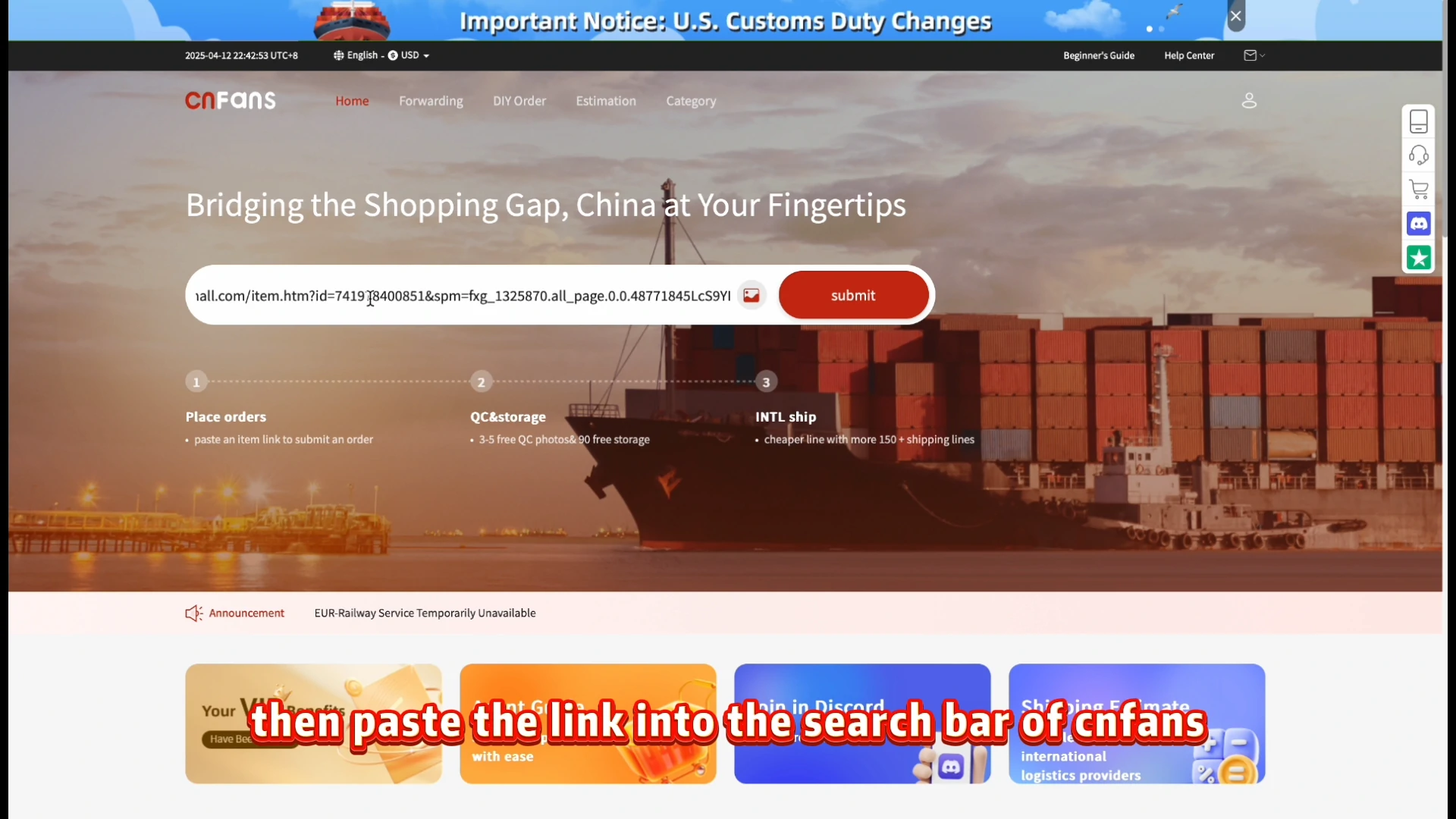
Start with the original seller URL, then paste it into CNFans’ product search. The historical demonstration uses the search field and Submit. Confirm that the result is the same seller and item; a similar photo or a catalogue card is not enough to identify the listing.
Start in the catalog. Browse a category, open the product page of anything you like, and add it to the want list. Then do the slow part: open the seller’s listing, copy the exact option name, check the size chart and the option price, and find a photo of your option.
2. Confirm the option and submit the item
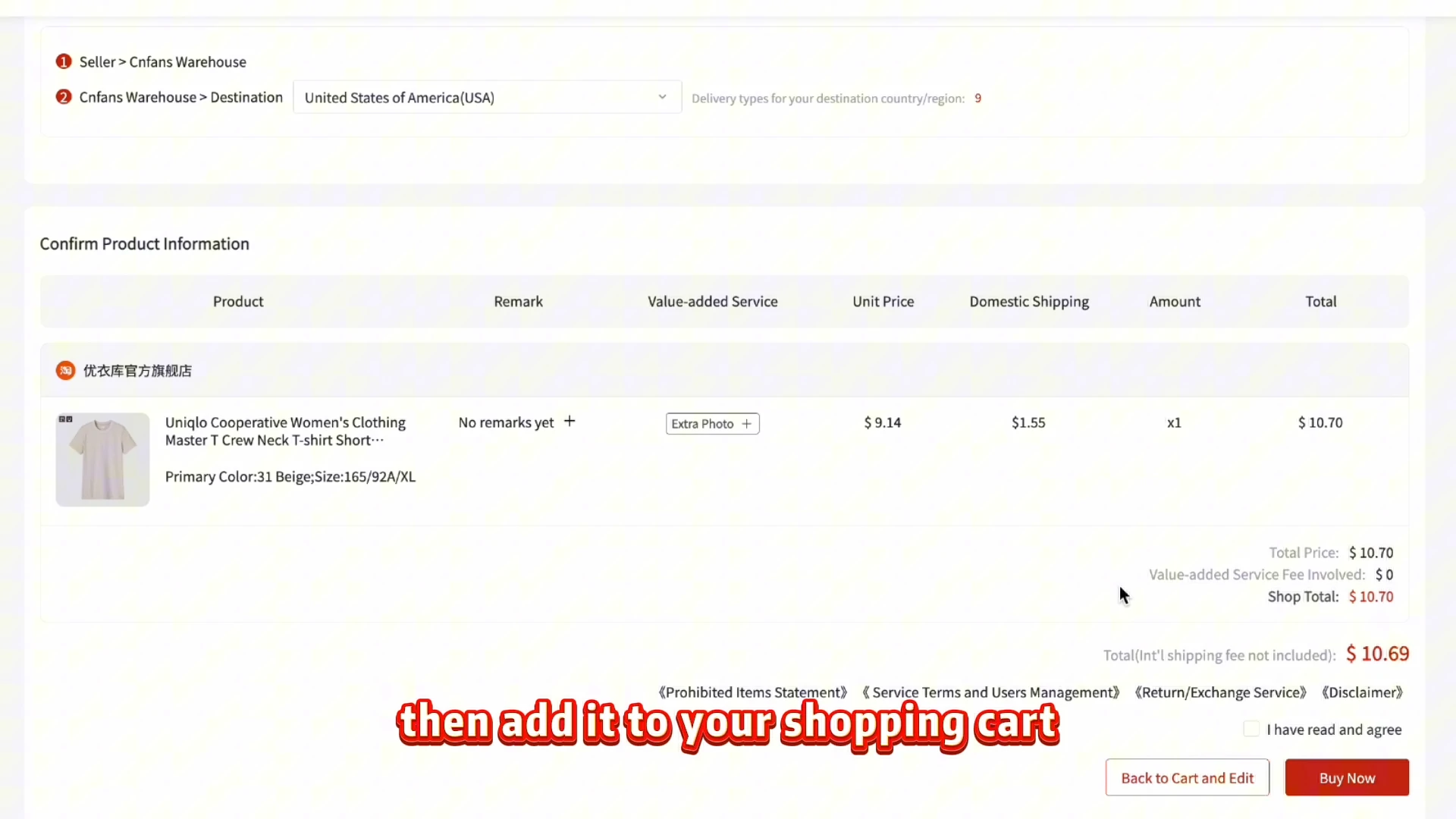
Choose the exact colour, size, version and quantity. Add the item to the cart or use the purchase action, then review the order summary, domestic postage, remark and any extra service. In the example, Back to Cart and Edit returns to the selection and Buy Now continues; neither means payment has succeeded.
The note is where the want list pays off. Give the option in the seller’s own words, add the size, and ask for anything you want checked, such as “please photograph the size label”. Keep it short. A buyer handling many orders reads notes quickly, and a clear line beats a paragraph.
Some agents also ask whether to buy if the price has gone up since you ordered, or whether to substitute a sold-out option. If you are asked, say no to substitutions unless you have a second option you have already checked.
3. Pay the goods order, before international freight
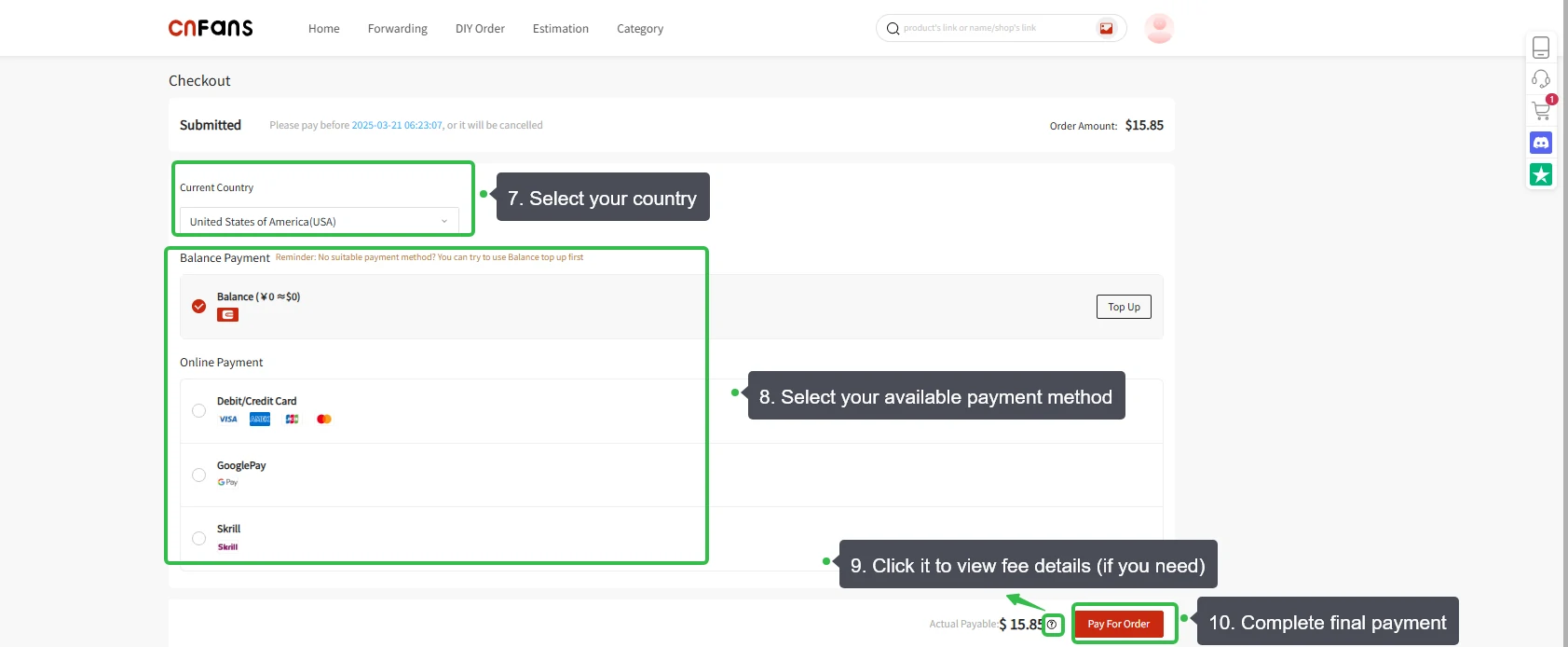
This payment is for the goods order, including domestic postage and any displayed service charges. International freight is a later decision. Check the destination, offered payment method, currency conversion and final payable amount before paying; keep the actual confirmation and order reference.
Before paying, read the methods actually offered to your account and the displayed exchange rate and fees. Historical card logos and help headings do not establish a currently supported method or a requirement to top up first.
Pay attention to the currency. Catalog prices are in yuan, and on 20 October 2026 one card showed ¥95.33 beside an approximate $14.24. The displayed conversion and your payment provider’s final charge can differ, and the costs page explains how those can differ.
4. Check the agent’s purchase in Orders
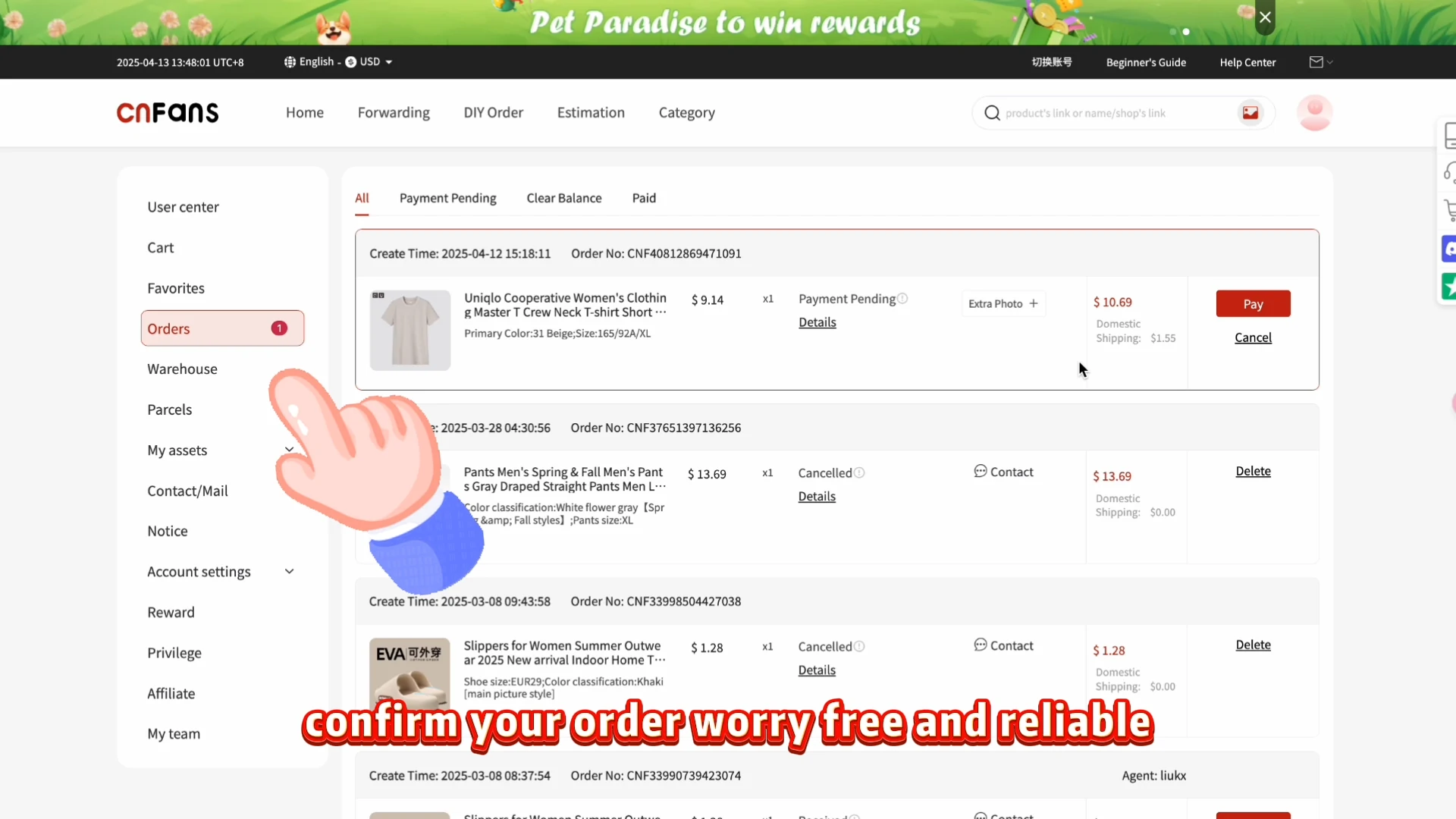
Open Orders and read the item’s real status and any message from the purchasing agent. Paying the order, the agent accepting it and the seller purchase being completed are separate events. Payment Pending is not a completed purchase, and Cancelled is not proof that a refund has arrived.
If an option is unavailable, ask the agent what choices are offered. Confirm an alternative explicitly, or request cancellation and track any approved refund. Do not assume that money returns automatically or to the original payment method.
5. Follow the seller’s delivery to the warehouse
After purchase, the seller sends the goods to the CNFans warehouse in China. Check seller dispatch and domestic tracking separately from the payment date. A courier delivery scan does not by itself mean warehouse intake or QC is complete. If a line is partially delivered, ask which items the seller parcel contained.
After the agent buys, the seller posts the item to the agent’s warehouse. This domestic leg usually takes a few days, but it depends on the seller: some keep stock on a shelf, others make or source to order. A listing that says 预售 (presale) is telling you to expect a wait.
Keep the find on your want list until it arrives at the warehouse. If the order is cancelled, you still have the five knowns written down, and a similar piece can be checked against the same notes.
6. Inspect the Warehouse record and QC photos
After intake, find the received item in Warehouse and open its available QC images. Compare the paid option, quantity, label and requested measurement with the evidence shown. A photograph cannot settle a hidden detail or guarantee authenticity, performance or fit. Ask about missing views and resolve a mismatch before international shipment.
Read the set calmly and in order: the whole item, the label, any measurement, then close-ups. Compare the colour with the option picture from the listing. If you requested an extra service, confirm it was accepted and then check whether the promised evidence is present.
Approving means you are happy for the item to wait in storage until you ship. If something is wrong, this is the time to ask for more photos or start a return, while the item is still close to the seller. The QC photos page goes through a set step by step.
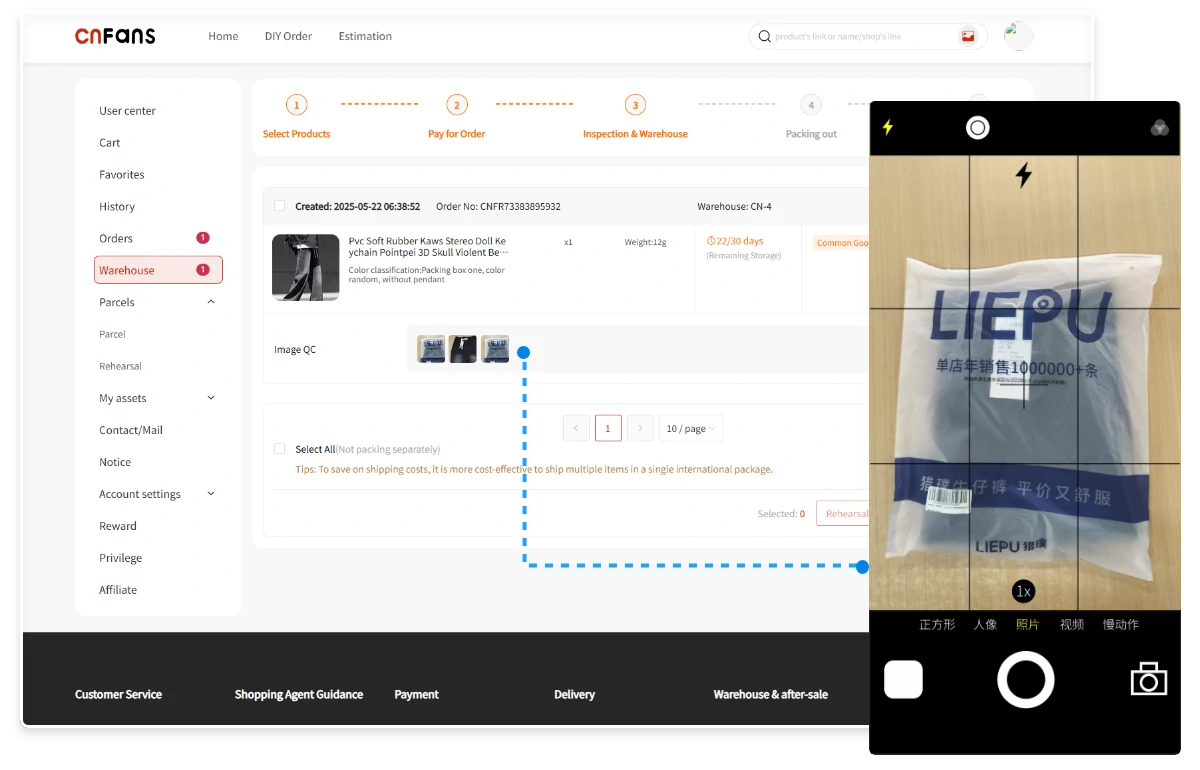
7. Select cleared items and request outbound shipping
Select only the Warehouse items you intend to send together, then check the destination, storage status and outbound eligibility. The demonstration shows the item checkbox, Rehearsal Packing and Submit. Resolve an Expired status or other restriction before relying on the selection. Confirm any rehearsal, packing or storage charge separately.
Parcel submission is the stage for selecting which stored items travel together. Check the account status and any storage or automatic-handling conditions rather than assuming unlimited waiting. Compare consolidation with separate quotes; grouping can reduce one charge while increasing volume or excluding a line.
Packing choices can include retaining retail boxes, removing courier packaging or adding protection. Ask which choices are available, what they cost and whether removing seals or tags affects return eligibility before authorising them.
Record the storage deadline for each item and confirm any extension charges. The earliest deadline may require splitting a parcel; a long storage allowance does not extend the seller’s return period.
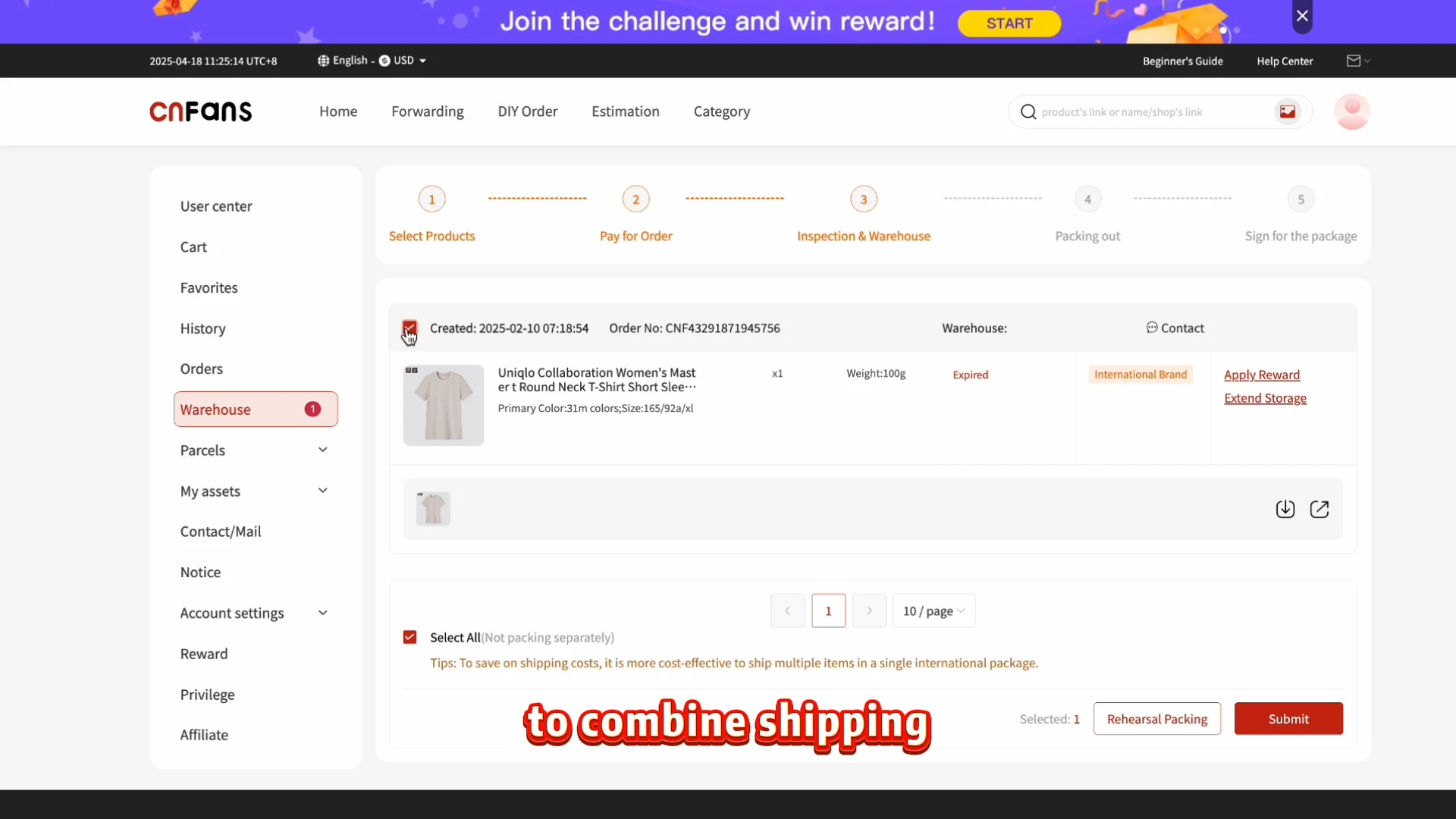
8. Choose the route and pay international freight
After the outbound request, compare the lines actually offered for the destination and contents, then review the shipping bill before paying. Check the chargeable weight or volume, packing and any optional service. An initial estimate may change after packing; keep the quotation, settlement and parcel reference.
Review the eligible lines, destination and packing choices at parcel submission. A quote may precede final weighing, and rehearsal may be a separate paid service. Confirm how the final charge is settled after actual size and weight are known. Old carrier logos do not confirm that a route is available for your item today.
The price depends on actual weight and, for bulky parcels, on size. A puffer jacket can cost more to ship than a heavier pair of jeans because it takes up more room. The shipping page explains volumetric weight and why grouping matters.
Keep the parcel ID, quoted charge, final settlement and tracking number. A later extra charge needs a clear reason and reference to the relevant weight, dimension or service.
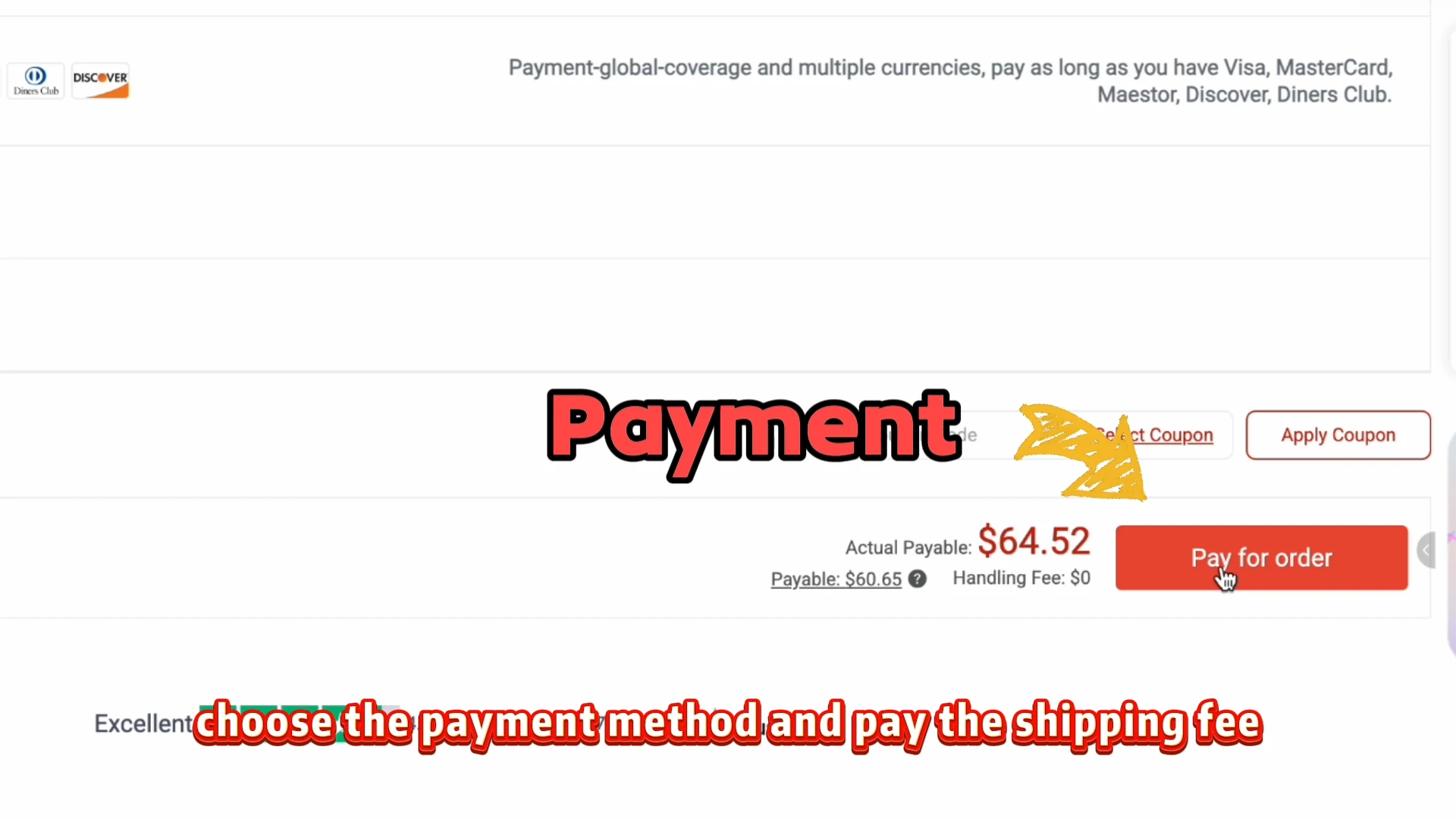
9. Follow the parcel after dispatch
After dispatch, use Parcels and the assigned tracking information to follow the shipment. A paid freight bill or submitted request alone does not establish that a carrier has the parcel. Keep the parcel ID, dispatch record and tracking number together; ask the agent to investigate an unexplained delay rather than inferring a location from silence.
Tracking can change between carriers, and gaps between scans occur. A quiet interval alone establishes neither loss nor a specific location such as customs. Use the line’s current tracking information and ask the agent to query an unexplained delay.
At delivery, film the unboxing if you can manage it, match every piece to its warehouse photos, and hold on to the packaging until you are sure all is well. If something is missing, the help page explains who to contact first.
Five knowns, tested on one cap
A cap appears in a group photograph in silver, pink and blue. Saving the picture gives you a visual reminder, but the order still needs the seller’s exact colour option. A translated word such as “grey” may not mean the silver cap you intended.
- Source: save the original listing URL, not only the catalogue category.
- Option: copy the selected colour text and quantity; keep a screenshot of the selection.
- Fit: ask for the head circumference range and closure type if these are missing.
- Item price: check the selected option rather than the lowest price in the card.
- Photo check: record whether you have inspected a useful photograph of the selected item. A seller photo only documents the advertised option; inspect your own warehouse photos when they become available.
At warehouse arrival you still need the received-item pictures. The want list saying “ready” means that you have recorded the five planning fields; it does not verify stock, a purchase, fit, seller quality or an available shipping line. A new answer can change the list, so keep it editable until those decisions are made.